Don't Buy Another Mouse for Fusion 360
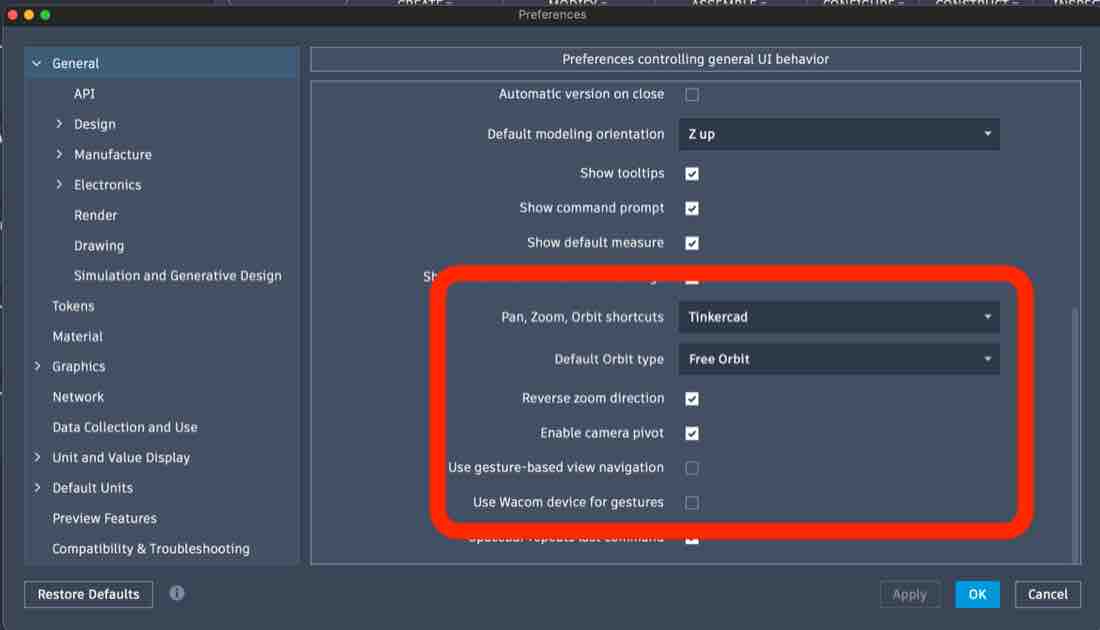
Every thread says the Magic Mouse is useless for Fusion 360 on a Mac, so buy a three-button mouse. You don't need to — three settings in Preferences → General fix it.
I wanted to keep mine: it works seamlessly across the Apple ecosystem. The mice meant for Windows machines that I tried had an inconsistent, frustrating interface I didn't want to live with.
- Pan, Zoom, Orbit shortcuts → Tinkercad — the one that matters; it remaps orbit to a click-drag the Magic Mouse can actually do.
- Reverse zoom direction → ON — so scroll-to-zoom isn't backwards.
- Use gesture-based view navigation → OFF — counterintuitive, but the touch surface misreads swipes.
You'll also need a middle-click
One thing no Fusion setting can fix: panning still wants a middle-click, and the Magic Mouse doesn't have one. You need a gesture tool to emulate it. I use Jitouch — the independently maintained open-source build on GitHub — and I honestly can't imagine using a computer without it. It's the single most important tweak I make to a Mac's interface, and almost nobody talks about it: the best of both worlds between keyboard efficiency and the mouse and trackpad.
The controls you end up with
- Pan — what the scroll-wheel click used to do: a two-finger click that Jitouch sends as a middle-click, dragged around.
- Orbit — a single right-click, dragged around.
- Zoom — run a finger up and down the top of the mouse like you're scrolling; it zooms in and out just as you'd want.